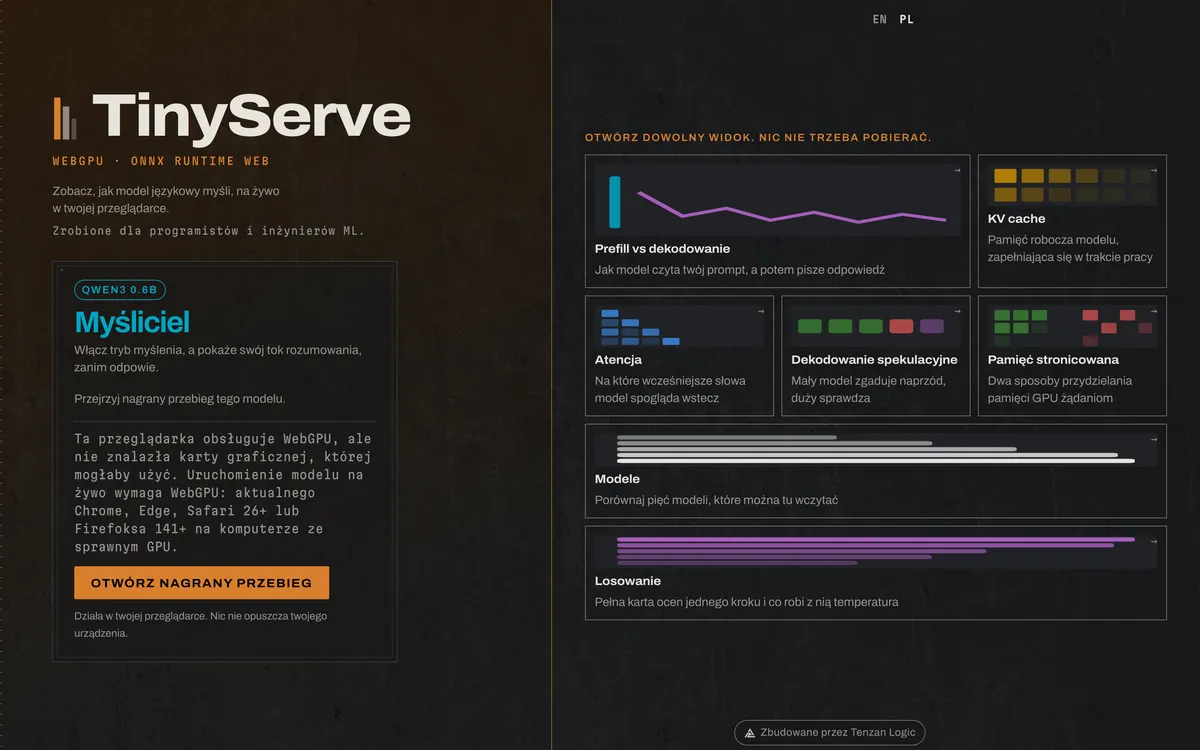
The screen you get when you open it: the tiles of views, from prefill and decoding to attention maps and next-token sampling.
Challenge
An LLM is a black box, even for engineers
Teams rolling out AI keep asking: why does a long prompt compute fast, while the answer comes out slowly? Why does graphics card memory run out on a longer conversation? Slide decks and blog-post diagrams do not answer that. TinyServe shows these mechanics live, on a real model, with no server and nothing to install.
How it works
Five inference mechanics, visible live
Prefill and decode
The two inference phases rendered separately: why a long prompt computes fast (prefill, parallel) while generating text is slower (decode, one token at a time).
KV cache
A chart of the memory climbing with every token, against the budget the context window allows: you see exactly how much GPU memory a longer conversation actually costs.
Attention heatmaps
A per-layer, per-head attention heatmap: which earlier tokens the model is actually looking at while generating the next one.
Speculative decoding and paged memory
A small model proposes a token, the large model accepts or rejects it (speedup with no quality loss); separately, a simulation of a block-based memory allocator (like vLLM's) versus contiguous allocation, with an out-of-memory visualization.
Next-token sampling
One step's full scorecard: the probabilities the model was choosing between, and what temperature does to them.
Numbers
A real model, not an animation for show
The conversation never leaves your machine.
5
models you switch live (Qwen3 0.6B and 1.7B, Llama 3.2, LFM2.5 1.2B, DeepSeek-R1) and compare their behavior with your own eyes.
552 MB
is the smallest model (Qwen3 0.6B): the size is measured from the hub before the download, not estimated. A second visit starts from the browser cache.
0
server requests during generation: everything runs on your machine, so nothing leaks out.
A tool for developers and ML engineers. Our own project. We built it and we run it ourselves. The model downloads once and then computes on your side.